Everything you actually need to know, without the jargon!
If you've ever seen an ad promising that a VPN will make you 'invisible online' or 'unhackable', you've witnessed some of the most enthusiastic overselling in the tech industry. The reality is more nuanced — and more useful. A VPN can be a genuinely valuable tool, but only if you understand what it actually does, and whether your situation calls for one. This guide cuts through the noise. We'll cover how VPNs work under the hood, who really needs one, the hidden downsides nobody talks about, and how the built-in options in your browser or operating system compare to a paid third-party service.
What does a VPN actually do?
A Virtual Private Network (VPN) does two core things:
It encrypts your internet traffic so that anyone snooping on your connection (a coffee shop Wi-Fi operator, an ISP, or a network admin) sees scrambled data instead of what you're actually doing.
It masks your IP address by routing your traffic through a server in a location of your choosing, making websites see that server's address rather than yours.
Here's the simplified journey your data takes when you use a VPN:
Your device connects to a VPN server (encrypted tunnel)
That server sends your request to the website on your behalf
The website responds to the VPN server
The server sends the response back to you, still encrypted
What a VPN does NOT do: it doesn't make you fully anonymous, it doesn't protect you from malware or phishing and it doesn't stop websites from tracking you via cookies or login sessions. It shifts trust from your ISP or local network to the VPN provider.
Residential users: do you actually need one?
For most people at home, the honest answer is: probably not for everyday use, but there are specific situations where a VPN earns its keep.
When a VPN makes sense for home users
Public Wi-Fi: airports, cafes, hotels. Unencrypted networks are low-hanging fruit for snoopers. A VPN here is genuinely useful.
Accessing geo-restricted content: streaming a service or accessing content not available in your region.
Privacy from your ISP: in some countries, ISPs can log and sell your browsing data. A VPN limits what they can see.
Travellers: if you are in a country with heavy internet censorship (China, UAE, etc.), a VPN may be essential for normal access.
When a VPN probably isn't necessary
General home browsing: your home router's connection is already far harder to intercept than public Wi-Fi.
Already-encrypted sites (HTTPS): the padlock in your browser means data is already encrypted in transit. A VPN adds another layer, but HTTPS does the heavy lifting.
Business Users: where it becomes essential
For businesses, VPNs are not optional, they are infrastructure! The use cases are more specific and the stakes are higher.
Remote access to company networks: staff connecting from home or on the road need a secure tunnel into internal systems, servers, and file shares.
Protecting sensitive data: legal, finance, and healthcare sectors routinely require encrypted connections for compliance reasons.
Site-to-site connectivity: linking multiple office locations securely as if they were on the same local network.
Zero Trust environments: modern enterprise setups often use VPNs as part of a broader security architecture alongside identity verification. Business VPNs are typically managed centrally by IT, configured for always-on connections and paired with device management policies, very different from a consumer app you download and toggle on.
The pitfalls of using a VPN
Nobody in a VPN ad will tell you these, but they matter.
Banking apps and financial services
Many banks flag VPN usage as suspicious activity. Their fraud detection systems notice that your IP address is suddenly in a different country or registered to a known VPN server. This can trigger account lockouts, declined transactions, or two-factor authentication loops. Best practice: turn your VPN off before using banking apps or your online bank.
Location-based services stop working
Food delivery, local search, weather, ride-hailing, and anything else that depends on knowing where you are will either break or give you results for wherever your VPN server is located. If your server is in Amsterdam and you're ordering lunch in London, the app will be confused.
Speed reduction
Routing your traffic through an additional server adds latency. Budget VPNs or servers under heavy load can slow your connection noticeably. Premium services have improved significantly here, but it's never zero impact.
Trust shifts, not disappears
When you use a VPN, you are not becoming anonymous, you are choosing to trust the VPN provider instead of your ISP. A disreputable VPN could log everything you do and sell it, which is arguably worse than your ISP. Always use a provider with an independently audited no-logs policy.
VPN blocking
Streaming services like Netflix actively block known VPN servers to enforce regional licensing. Some corporate networks also block VPN traffic. What works today may not work tomorrow.
Third-Party VPNs: what to look for
The market is flooded with VPN providers, some reputable, many not. Here is what separates the trustworthy from the rest.
Signs of a reputable VPN
Independently audited no-logs policy: not just claimed, but verified by a third-party security firm (Mullvad, ProtonVPN, ExpressVPN, NordVPN have all done this).
Open-source clients: allows the security community to inspect the code.
Strong protocols: wireGuard and OpenVPN are current standards. Avoid anything proprietary with no transparency.
Jurisdiction: providers based in countries with no mandatory data retention laws (Switzerland, Iceland, Panama) offer stronger legal protection.
Free VPNs: a word of caution
If you're not paying for it, you're often the product. Many free VPNs monetise through data collection and selling your browsing habits. Some have been caught injecting ads or redirecting traffic. For casual, low-stakes browsing they may be acceptable — but never use a free VPN for anything sensitive.
Built-in VPN options: what your devices and browsers offer You may already have privacy features built into your ecosystem, but they are not all equal and some aren't technically VPNs at all.
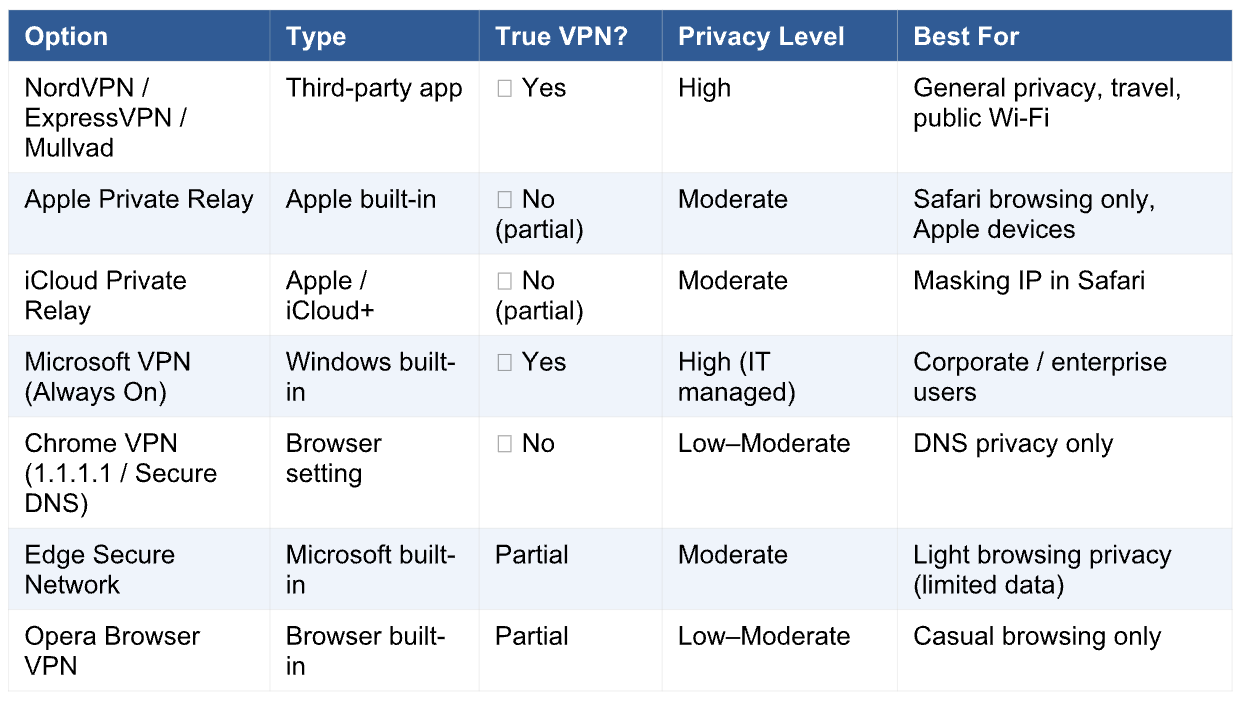
Apple Private Relay/iCloud Private Relay
Available to iCloud+ subscribers on Apple devices. Private Relay splits your browsing data between two separate servers, one run by Apple, one by a third party. So neither knows both who you are and what you're browsing. It works in Safari only and doesn't cover other apps. It's a meaningful privacy improvement, but it's not a full VPN and won't let you appear to be in a different country.
Microsoft VPN (Windows built-in/always on VPN)
Windows has robust VPN support built in, supporting protocols like IKEv2, L2TP, and SSTP. For home users, you would need a VPN server to connect to, it doesn't provide one. For businesses, IT departments can configure Always On VPN so corporate devices automatically connect to the company network without any user action. This is enterprise-grade, not consumer.
Microsoft Edge Secure Network
Edge includes a built-in privacy feature powered by Cloudflare that masks your IP while browsing. It's limited to 5GB per month on the free tier and only covers Edge browser traffic, not your full device. Useful for light, casual browsing privacy, but not a replacement for a full VPN.
Chrome and Google
Google Chrome itself does not include a VPN. Chrome does support Secure DNS (DNS-over-HTTPS), which encrypts your DNS queries and prevents your ISP from seeing which domains you're looking up, but this is not the same as a VPN. Google One (the premium tier) offers a VPN feature on Android and some platforms, but it routes your traffic through Google, which raises its own questions about data trust.
Safari and iOS
On iPhone and iPad, Safari benefits from iCloud Private Relay when you're subscribed to iCloud+. For full device-level VPN coverage on iOS, you still need a third-party VPN app installed from the App Store, which iOS integrates at the system level via its VPN settings. This means the VPN covers all apps, not just Safari.
Security Suite VPNs: AVG, McAfee, Bitdefender, Norton and Friends Many of the big antivirus and security suite brands now bundle a VPN into their packages. It sounds convenient: one subscription, one app, everything covered. But there are some important caveats worth knowing before you rely on them.
What they offer
Products like AVG Secure VPN, McAfee Safe Connect, Bitdefender VPN, Norton VPN (formerly Norton Secure VPN), and Kaspersky VPN Secure Connection all work on the same basic principle as standalone VPNs: they encrypt your traffic and route it through their servers. Most use established protocols like OpenVPN or WireGuard under the hood, and some are actually powered by well-known VPN backends (Bitdefender VPN, for example, is built on Hotspot Shield's infrastructure).
The conflict of interest problem
Here's the core tension: your antivirus software already has deep access to your device: it monitors files, processes and behaviour. Adding a VPN means that same company now also sees your encrypted internet traffic. You're consolidating a lot of trust in one vendor. For most reputable brands this isn't a crisis, but it's worth being conscious of, particularly with providers that have had past controversies around data practices. Kaspersky in particular carries a specific flag (it's a Russian-developed product and has been banned from use on US government systems and flagged by cybersecurity agencies in the UK and EU). For a security-conscious home user, this is worth weighing up regardless of the technical quality of the product.
Data caps: the small print
Many bundled VPNs impose strict data limits on lower-tier subscriptions. McAfee Safe Connect, for instance, has historically offered as little as 500MB per day on its basic tier, enough for light browsing but not streaming or large downloads. Always check the data allowance before assuming a bundled VPN gives you the same coverage as a standalone service.
Are they actually good?
The honest assessment: they're fine for occasional use and better than nothing on public Wi-Fi. But they generally lag behind dedicated VPN providers on server count, speed, privacy credentials, and features like kill switches or split tunnelling. If VPN capability is important to you, a dedicated service from a privacy-first provider is the better investment. If you already pay for a security suite and just want basic protection on the go, the bundled VPN is a reasonable bonus, just know its limits.
Anti-Tracking Software: useful tool or unnecessary overhead? Anti-tracking tools have become increasingly common, built into browsers, sold as standalone apps and bundled into security suites. But there's genuine confusion about what they do, how they differ from a VPN, and whether they're worth adding to your setup.
What anti-tracking actually does
Anti-tracking software targets a different threat than a VPN. While a VPN hides your IP address and encrypts your traffic, anti-tracking focuses on blocking the scripts, pixels, and fingerprinting techniques that websites use to follow you around the internet. This includes:
Third-party tracking cookies: small files placed by advertisers to follow you across different sites.
Browser fingerprinting: websites can identify you by your unique combination of browser, screen size, fonts, and settings even without cookies.
Tracking pixels: invisible images embedded in emails and pages that report back when you open or view them.
Cross-site scripts: code that follows your behaviour across multiple domains.
VPN vs anti-tracking: they solve different problems
A VPN stops your ISP and network from seeing what you do. Anti-tracking stops websites themselves from profiling you. They're complementary, not interchangeable. You can have a VPN running and still be heavily tracked by the sites you visit — and you can use anti-tracking without a VPN and still expose your IP address. Ideally, you use both.
Where to find anti-tracking tools
Built into browsers: Firefox has Enhanced Tracking Protection on by default.
Safari's Intelligent Tracking Prevention (ITP) uses machine learning to limit cross- site tracking. Edge has Tracking Prevention with three adjustable levels.
Browser extensions: uBlock Origin remains the gold standard for blocking trackers and ads. Privacy Badger (from the EFF) learns which trackers to block as you browse.
Standalone apps: Tools like Malwarebytes Privacy or Ghostery offer broader device-level tracking protection.
Bundled in security suites: Most modern antivirus packages include some form of anti-tracking, though effectiveness varies considerably.
The downside: broken websites
Aggressive anti-tracking can break websites. Login buttons stop working, paywalls behave strangely, embedded videos don't load, and some shopping carts lose their contents. This is because many tracking scripts are entangled with legitimate site functionality. The more aggressive the blocking, the more you'll encounter these issues. Most tools offer a whitelist function so you can make exceptions for sites you trust.
So, is anti-tracking software worth it?
Yes, broadly speaking. The baseline protection built into modern browsers (especially Firefox and Safari) is a reasonable starting point for most users without any additional setup. For anyone who wants stronger protection, adding uBlock Origin to your browser is free, lightweight, and highly effective. Paid anti-tracking tools add some value but are rarely essential unless you're dealing with very specific threat scenarios. The one caution: don't let it run so aggressively that it makes your daily browsing frustrating. At that point, people tend to disable it entirely, which leaves them worse off than a sensible middle setting.
The Verdict: who should use what?
Home users who mostly browse from home: iCloud Private Relay (if on
Apple) or Edge Secure Network gives light privacy without the overhead. Pair with Firefox or Safari's built-in tracking protection. You probably don't need a paid VPN unless you travel frequently or use public Wi-Fi.
Frequent travellers and remote workers: a reputable paid VPN (Mullvad, ProtonVPN, NordVPN) is worth the cost. Enable it on public networks, disable it for banking.
Privacy-conscious users: a paid, audited VPN combined with uBlock Origin and a privacy-first browser (Firefox or Brave) gives you a strong, layered baseline.
Business users: speak to your IT department. Consumer VPN apps are not a substitute for enterprise VPN infrastructure.
Streamers wanting international content: NordVPN and ExpressVPN have the best track record for bypassing geo-restrictions, though this is a constant cat- and-mouse game.
Security suite users (AVG, McAfee, Norton etc.): the bundled VPN is a useful bonus for occasional use, but check the data cap and treat it as supplementary rather than a full replacement for a dedicated VPN. The bottom line: a VPN is a tool, not a silver bullet. Anti-tracking adds a complementary layer that a VPN alone can't provide. Used together, with a trustworthy provider and sensible settings, they give you genuinely meaningful protection. Used blindly, they can slow you down, lock you out of your bank, and create more friction than security. Know what problem you're solving before you buy.
How can SiSTEMZ help?
At SiSTEMZ, we work with businesses to implement layered security that goes beyond a VPN alone. One of the most effective and often overlooked tools we deploy is OpenText DNS Protection, which blocks malicious domains, phishing sites and harmful content at DNS level, before anything even reaches your network or devices. Think of it as a security checkpoint that operates invisibly in the background, 25/7. It works alongside, not instead of a VPN and is particularly valuable for businesses with remote workers, multiple sites or staff using personal devices. If you would like to know whether DNS protection is the right fit for your setup, we are happy to have that conversation. Contact the SiSTEMZ team at help@sistemz.co.uk and we will take the guesswork out!
Published by Sistemz Ltd | All third-party product names are trademarks of their respective owners.